


Review on 4G LTE modem MikroTik LHG LTE6 kit white by Michal Michal ᠌

The perfect purchase for me, exactly what I was looking for!
This is a complex and flexible enterprise device in which we (individuals / summer residents) use one setting. I am writing how to set it up, because I myself ran into pitfalls: * Connect directly to laptop * Download WinBox (and look for your router in neighbors there) or go to 19220228.88.1 * We insert the SIM with the chip up, tightly - until it clicks (do not be afraid to push it tighter with something like a pen rod or a paper clip, I lost two hours on this with the SIM NOT INSERTED status) * In general, if the firmware version is new (and kit6 is more or less new), then all you need is to register your operator's APN in quickstart, set Bands (I set 3,7,20), and check NAT / UPNP (and if you need to raise DHCP, it will rise automatically). * If the old one, select Interfaces (in the web version, go to Websetup or something like that), press the lte1 interface, go to the LTE APNs tab, and edit Default or create a new one, select the desired APN and Bands in the first tab. * Just in case, go to the System-> Reboot tab (reboot). * We are waiting for 5-10 minutes and we are going to look for the best signal (in the attachment there is a picture with indicators that RouterOS will show you on the Quickstart or LTE tab).
I wanted to add some photos to my review to give a better idea of my experience.
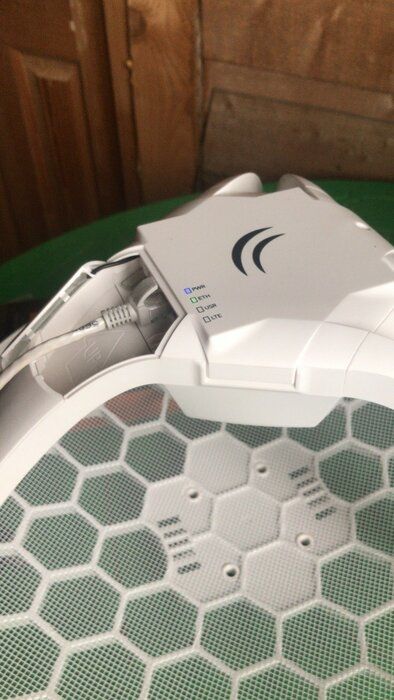
- 30 Mbit/sec. where without an antenna (cheap, on a coaxial cable) communication does not work at all
- Have not found You can find simpler devices with similar qualities (read w3bsit3-dns. Com about the Internet to the country)
New products
Comments (1)

Similar reviews
Top products in 📡 Network Antennas

📶 Hawking HAI6SIP: Boost Your Wireless Signal Range with Hi-Gain 6dB Omni-Directional Antenna

9 Review

Gadgets World FBA_ALFA ARSN19M OMNI Directional High Gain
9 Review

Asus RP-N12 N300 WLAN Repeater 🔁 802.11 B/G/N - Boost Your Wireless Range!

10 Review

📡 MikroTik LHG 5: High-Gain Dual Polarization Grid Antenna, Enhanced 5 GHz Performance (US Version)

9 Review
Another interesting products

🔌 HOYOKI 9 in 1 USB C Hub Adapter: Ethernet 1000Mbps, 4K HDMI, 3 USB 3.0 Ports, 5Gbps USB-C Data, 100W PD Thunderbolt 3, SD/TF Slots for MacBook, Dell XPS and More Type C Devices
6 Review

🔌 StarTech.com NETRS232 Serial to IP Ethernet Device Server - DIN Rail Mountable - Serial Device Server - Serial Over IP Device Server (Black)

4 Review

iVANKY MacBook Pro Docking Station, 9-in-2 USB C Hub Adapter with 4K Triple Display, 100W PD3.0, Ethernet, 2 HDMI, USB-C 3.0, 2 USB-A 3.0, SD & TF for MacBook Pro/Air
9 Review

🔌 Purgo USB-C Hub Adapter Dock for MacBook Air M1 2021-2018 and MacBook Pro M1 2021-2016 – 4K HDMI, 100W Power Delivery, 40Gbps Thunderbolt 3, 5K@60Hz, USB Type-C, 2 USB 3.0, SD/Micro Card Readers (Gold)
5 Review