


Review on 🖱️ Logitech MX Master Wireless Mouse: High-Precision Sensor, Easy-Switch up to 3 devices, Meteorite Black by Cha Eunu ᠌

Satisfactory product quality, good price.
Everything is clear with the pluses, the mouse is top and it’s not for nothing that everyone talks about it, but: 1. A button with gestures is something: a. Small (it is almost not felt tactilely) and without looking it is very problematic to find it the first time. b. located in such a way that I can’t even imagine where it can be pressed so as not to twist the finger or intercept the mouse 2. How much I did not suffer from the Flow mode (I danced with a tambourine, but I did not see anything except the message Please enable logitech flow on other computers). 3. Accordingly, the button for switching devices from below is also not very conveniently located, because when it works on 2 computers at the same time, each time turning the mouse over to switch to the second device is not an idea.
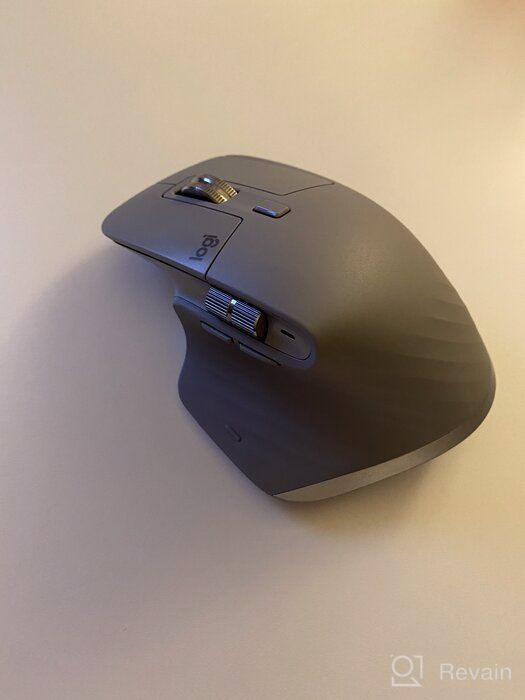
- 1. Functionality 2. The presence of horizontal scrolling
- 1. Gesture Button Locations 2. Device switch location 2. Flow mode never started
New products
Comments (0)
Similar reviews




Top products in ⌨️ Keyboards, Mice & Accessories

Renewed Logitech K800 Wireless 💡 Illuminated Keyboard: Brighter, Better, and More Convenient
204 Review

Logitech M510 Blue Wireless Mouse with USB 🖱️ Unifying Receiver - Comfortable Shape, Back/Forward Buttons and Side-to-Side Scrolling

199 Review

Renewed Logitech MX Master 🐭 3 Advanced Wireless Mouse: Exceptional Performance Guaranteed
233 Review

Wireless Bluetooth Graphite 🖱️ iPad Mouse - Logitech Pebble i345

184 Review
Another interesting products

Renewed Logitech G PRO X Wireless Lightspeed Gaming Headset with Blue VO!CE Mic Filter for Immersive Gaming Experience
122 Review

🎥 Logitech C270 Webcam: Crystal Clear Video and Superior Quality
183 Review

Apple AirPods Pro MagSafe RU Wireless Headphones, White
159 Review

💻 Get Amazing Video Quality with Logitech HD Pro Webcam C920 (Discontinued Edition)
83 Review